The Cisco ATA186 supports G.729, G.729A, G.729AB2, G.723.1, G.711a-law and G.711µ-law codecs.
The problem is if you are using both analog ports and G.729, the second port is limited to using G.711.
Although this is documented in the datasheet(s), sometimes you need to learn from experience. This is an import consideration if deploying analog devices at sites served by limited bandwidth WAN links. You CAN associate new regions and device pools with only the second port to set G.711 as the codec between regions, but you need to be bandwidth cognizant.
Thursday, July 23, 2009
Monday, July 20, 2009
Dialer.exe missing in Windows XP
My office's Windows XP image does not include the phone dialer application by default.
To find it from a command line, run the following, where is the location of the i386 folder:
expand\i386\dialer.ex_ "C:\Program Files\Windows NT\Dialer.exe"
expand\i386\AVTAPI.DL_ "C:\Program Files\Windows NT\avtapi.dll"
regsvr32.exe "C:\Program Files\Windows NT\avtapi.dll"
To run the application, from the command line you can run "C:\Program Files\Windows NT\Dialer.exe"
To find it from a command line, run the following, where
expand
expand
regsvr32.exe "C:\Program Files\Windows NT\avtapi.dll"
To run the application, from the command line you can run "C:\Program Files\Windows NT\Dialer.exe"
Sunday, June 07, 2009
Visio and Fractions in Text boxes
I only use one Dynamips / Dynagen lab configuration for all my testing. It's extensive enough to allow me to add features or techniques in isolated network areas without reinventing the whole network. After doing so, I also have the ability to see how the changes may affect the overall design very easily.
Unfortunately, if I don't maintain some documentation on the network, it becomes counter productive to depend on it to test specific features and conditions.
So Visio is an obvious solution, but one thing bugged me. When I dropped a text field on the diagram to hold some basic interface info, like:
R1
F0/0 = 10.101.10.51 / 24
S1/0 = 192.168.1.1 / 30
S½ = 192.168.1.13/30
the IP interfaces with port numbers that can be considered a common fraction (i.e. 1/2 above) get converted to tiny little depictions of fractions. This isn't the worst thing in the world, but does get distracting on a large scale.

Visio does this by default (at least my Visio 2003 version). If you navigate to Tools | AutoCorrect Options and then to the AutoFormat As You Type tab, you'll find a check mark to convert fractions to fraction characters.
Uncheck and you're done.
Unfortunately, if I don't maintain some documentation on the network, it becomes counter productive to depend on it to test specific features and conditions.
So Visio is an obvious solution, but one thing bugged me. When I dropped a text field on the diagram to hold some basic interface info, like:
R1
F0/0 = 10.101.10.51 / 24
S1/0 = 192.168.1.1 / 30
S½ = 192.168.1.13/30
the IP interfaces with port numbers that can be considered a common fraction (i.e. 1/2 above) get converted to tiny little depictions of fractions. This isn't the worst thing in the world, but does get distracting on a large scale.

Visio does this by default (at least my Visio 2003 version). If you navigate to Tools | AutoCorrect Options and then to the AutoFormat As You Type tab, you'll find a check mark to convert fractions to fraction characters.
Uncheck and you're done.
Thursday, June 04, 2009
Volume Control in Windows XP
After plugging headphones into my T61 for the first time and wishing I had more control over the sound than via the proprietary keyboard buttons, I found Windows' volume control missing.
1. You can try to display it in the SysTray via the Control Panel.
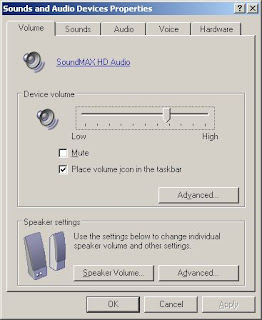 You can try Control Panel | Sound and Audio Devices and click Place Volume Icon in the Task Bar. You should have the tiny speaker icon down in the bottom right corner of your screen.
2. If you find "the Volume Control program has not been installed", you can restore it from your XP installation media (or possibly from the i386 folder on your hard drive). Find the i386 folder, navigate to it via command line and type:
expand -r sndvol32.ex_ %systemroot%\system32
You can then use the Control Panel method to restore it to the SysTray.
1. You can try to display it in the SysTray via the Control Panel.
 You can try Control Panel | Sound and Audio Devices and click Place Volume Icon in the Task Bar. You should have the tiny speaker icon down in the bottom right corner of your screen.
2. If you find "the Volume Control program has not been installed", you can restore it from your XP installation media (or possibly from the i386 folder on your hard drive). Find the i386 folder, navigate to it via command line and type:
expand -r sndvol32.ex_ %systemroot%\system32
You can then use the Control Panel method to restore it to the SysTray.
Wednesday, May 06, 2009
VMWare DHCP on bridged networks
After starting up an Ubuntu image in VMWare server 2.0.1 on my XP based laptop, I found the it could not retrieve a DHCP address.
Per KevinG at http://communities.vmware.com/message/101202
I found my VMnet0 adapter bridged to a TAP-Win32 adapter, likely done so during some utility install.
Per KevinG at http://communities.vmware.com/message/101202
Select "Start"->"All Programs"->"VMware"->"Manage Virtual Networks"
Click on the "Automatic Bridging" tab and uncheck "Automatically choose an available physical network adapter to bridge to VMnet0"
Click on the "Host Virtual Network Mapping" and use the dropdown menu for VMnet0 to select the physical network on the host that you want to bridge to.
I found my VMnet0 adapter bridged to a TAP-Win32 adapter, likely done so during some utility install.
Subscribe to:
Posts (Atom)